Jump to content
Zum Start hinzufügen

Weitere Informationen

3D-Modellbahn Studio

Eine Vollbild-App auf Ihrem Startbildschirm mit Push-Benachrichtigungen und mehr.

So installieren Sie diese App auf iOS und iPadOS
  1. Tippen Sie auf das Teilen-Symbol in Safari
  2. Scrollen Sie durch das Menü und tippen Sie auf Zum Startbildschirm hinzufügen.
  3. Tippen Sie oben rechts auf Hinzufügen.
So installieren Sie diese App auf Android
  1. Tippen Sie auf das 3-Punkte-Menü (⋮) in der oberen rechten Ecke des Browsers.
  2. Tippen Sie auf Zum Startbildschirm hinzufügen oder App installieren.
  3. Bestätigen Sie durch Tippen auf Installieren.

Petruchio

Mitglieder
  • Benutzer seit

  • Letzter Besuch

  1. Goetz gefällt ein Beitrag im Thema: Can't get started
  2. Why so it does, thankyou Goetz. May your trains always chase their tails.
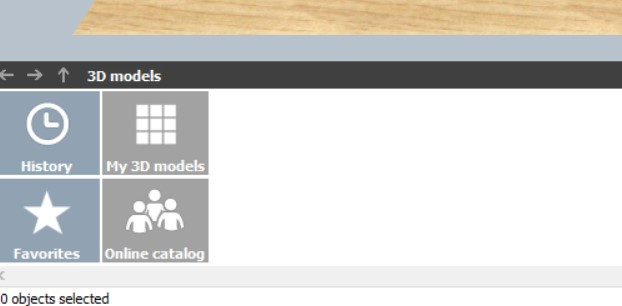
  3. My start screen has only four icons in the bottom left corner see below. I've activated and logged in, how do I get going?

Push-Benachrichtigungen konfigurieren

Chrome (Android)
  1. Tap the lock icon next to the address bar.
  2. Tap Permissions → Notifications.
  3. Adjust your preference.
Chrome (Desktop)
  1. Click the padlock icon in the address bar.
  2. Select Site settings.
  3. Find Notifications and adjust your preference.