mich.chr
Mitglieder
-
Benutzer seit
-
Letzter Besuch
Alle erstellten Inhalte von mich.chr
-
The *.mdb file is >4Mb so I can't post it here. I can mail it. Pls. write to *****@*****.** and I will reply with the *.mdb (however with some latency over the hollidays :-)) Ich wünche Ihn ein frohe Weinacht :-) B/R Michael
-
Neo I'm pleased to help. If you would like the associated *.mbd file please indicate so.
-
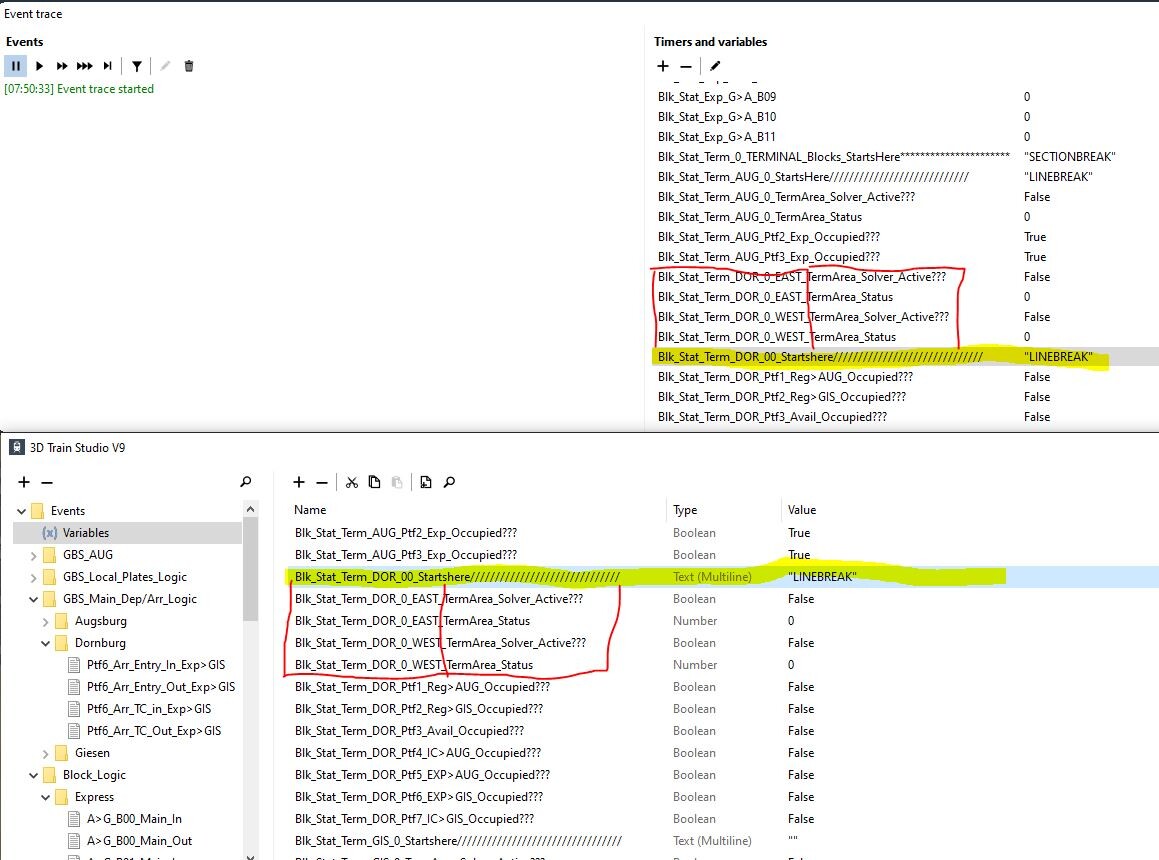
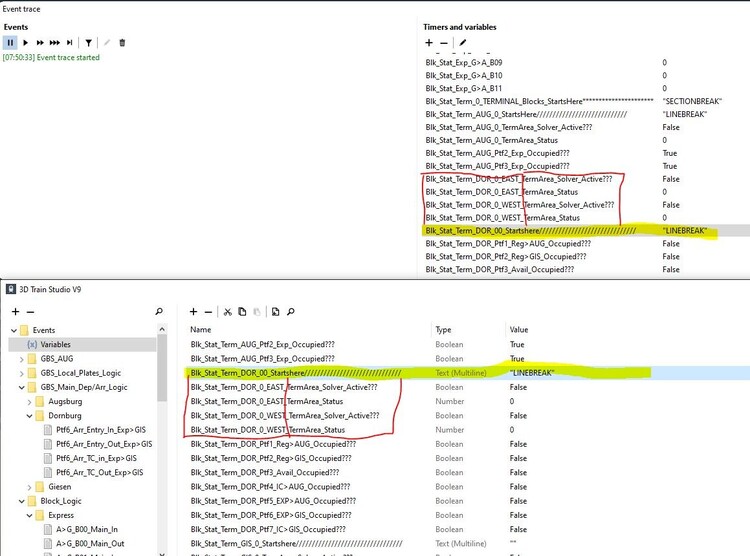
NOTE: This is observed for V9 (I'm aware this thread is for 9.5 beta - but could not find a thread for possible error reporting). We are clearly in the department for minor issues here :-) However there is a inconsistency between the event editor (F6) and the event trace window(F12) with regards to sorting of variables. As you can see in the attached screendump I have taken care to name the VARs in a logic order including inserting "seperatorlines" between sections for VARs. However in the eventtrace window (Timers & VAR pane) the seperator "Blk_Stat_Term_DOR_00_Startshere//////////////////////////////" at the top of relevant sections as it is in the event editor window. Just thought You would like to know. Thx. for the application - I really enjoy working it. Best Regards Michael Christiansen Silkeborg, Denmark
-
Hey Easy That did the trick. Thanks a lot for your help. I would not have gotten there if you hadn't provided the assist :-) And I can see the "property/variable has value" condition has a lot of utility build into it that will soon come in handy for me. Best Regards Michael
-
Hi Easy and thanks for your kind help. With the condition I want to test if any loco that runs over the trackcontact has a certain keyword and then do actions. Ich möchte prüfen, ob eine Lokomotive, die über die Gleiskontaktstelle fährt, ein bestimmtes Schlüsselwort aufweist, und dann Aktionen ausführen, wenn sie dieses Schlüsselwortkriterium erfüllt.if they meet this keyword criteria
-
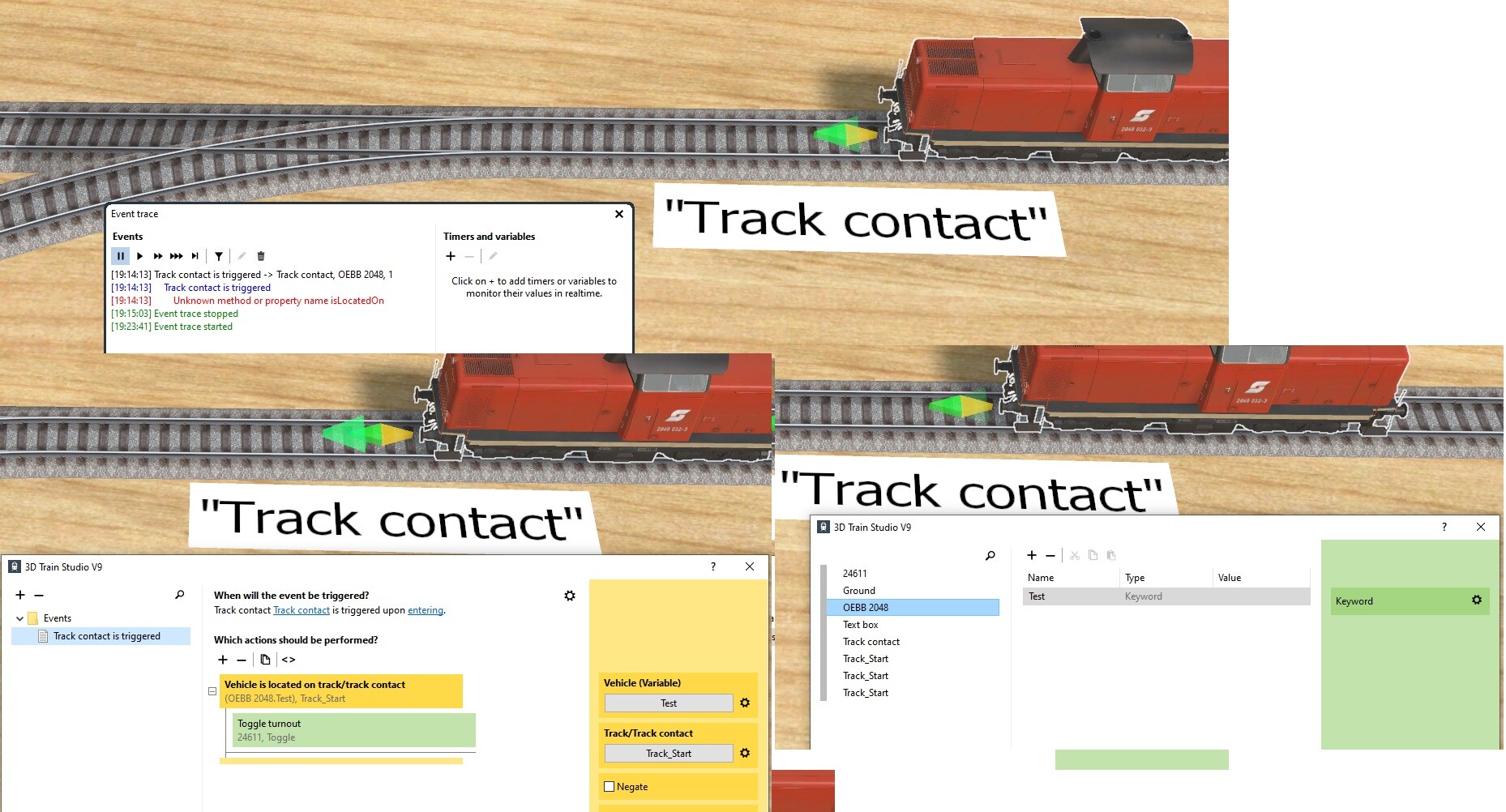
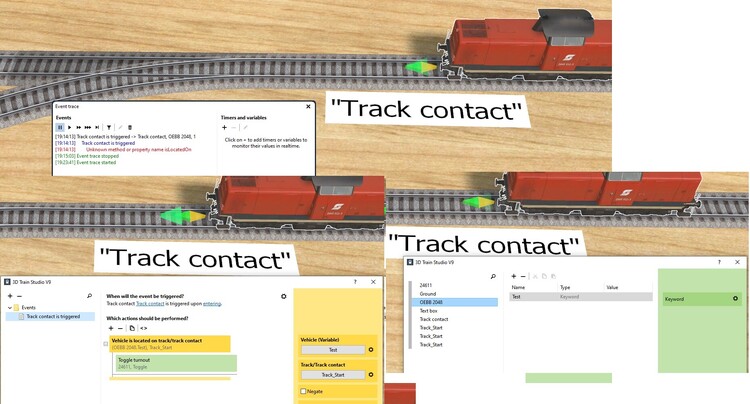
Running this small test scenario I get an error when I run over the trackcontact that executes the event. See the associated picture and scenario. Three tracks, a turnout, a track contact (names "Track Contact") and a loco with a keyword (="test") is created. An event with trigger "Track contact is triggered" is created with one condition "Vehicle is located on Track/Trackcontact". The condition is true if: >>VEHICLE<< - Here I select "Variable">"Objectvariable" and select the keyword "TEST" (from the loco) >>TRACK/TRACKCONTACT<< - Here I select the trackcontact´"Track Contact". The action associated if "TRUE" is toggling the turnout. When I run the loco over the Track contact the scenario stops and eventtrace reports "Unknown method or property name isLocatedOn". Am I doing something wrong os is it supposed to do this Best Regards Michael Beim Ausführen dieses kleinen Testszenarios erhalte ich einen Fehler, wenn ich über den Gleiskontakt fahre, der das Ereignis auslöst. Siehe zugehöriges Bild und Szenario. Es werden drei Gleise, eine Weiche, ein Gleiskontakt (mit dem Namen „Gleiskontakt“) und eine Lokomotive mit dem Schlüsselwort „test“ erstellt. Es wird ein Ereignis mit dem Auslöser „Gleiskontakt wird ausgelöst“ und der Bedingung „Fahrzeug befindet sich auf Gleis/Gleiskontakt“ erstellt. Die Bedingung ist erfüllt, wenn: >>FAHRZEUG<< – Hier wähle ich „Variable“ > „Objektvariable“ und das Schlüsselwort „TEST“ (von der Lokomotive). >>GLEIS/GLEISKONTAKT<< – Hier wähle ich den Gleiskontakt „Gleiskontakt“. Die zugehörige Aktion bei „WAHR“ ist das Umschalten der Weiche. Wenn ich die Lokomotive über den Gleiskontakt fahre, stoppt das Szenario und Eventtrace meldet „Unbekannter Methoden- oder Eigenschaftsname isLocatedOn“. Mache ich etwas falsch oder ist das so beabsichtigt? test_keyword.mbp
-
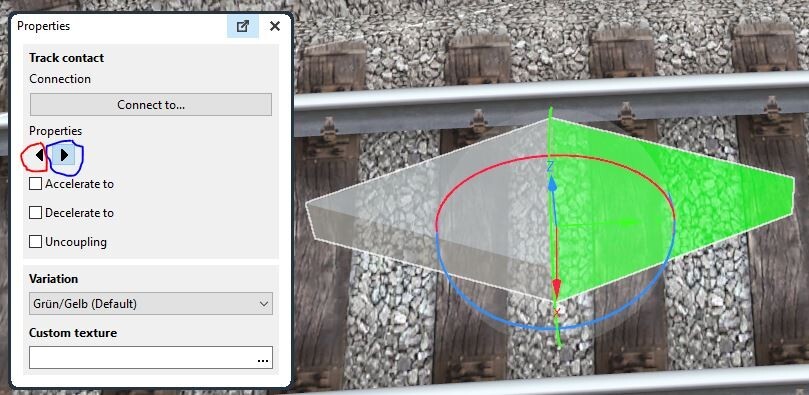
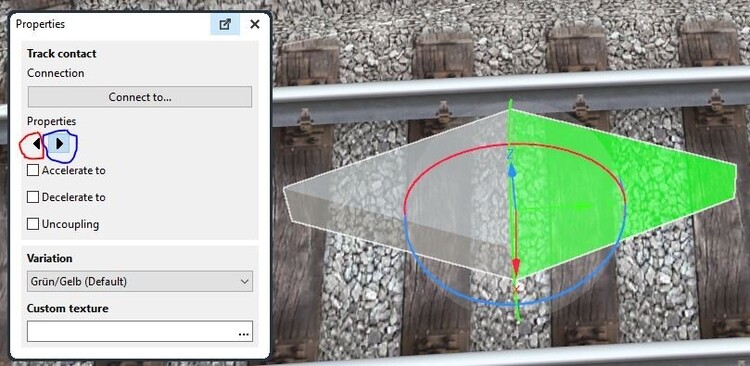
Hallo Streit_ross Thank you for your input. I really leared something new and important here. I will just enhance the explaination a bit so others can use the info as well. If you select properties for Track contacts the two left/right arrows in the properties dialogue can be disabled/enabled as shown below. Here I have disabled triggering in the Left direction by clicking on the left arrow (red circle) whereas it is enabled in the right direction (blue circle / green arrow) Vielen Dank für Ihren Beitrag. Ich habe hier wirklich etwas Neues und Wichtiges gelernt. Ich werde die Erklärung nur ein wenig ergänzen, damit auch andere die Informationen nutzen können. Wenn Sie Eigenschaften für „Gleiskontakt“ auswählen, können die beiden Pfeile nach links/rechts im Eigenschaftendialog wie unten gezeigt deaktiviert/aktiviert werden. Hier habe ich das Auslösen in der linken Richtung deaktiviert, indem ich auf den linken Pfeil (roter Kreis) geklickt habe, während es in der rechten Richtung aktiviert ist (blauer Kreis / grüner Pfeil).
-
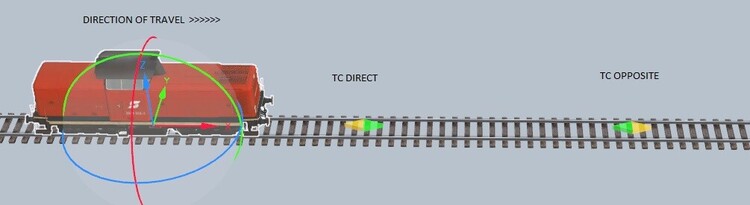
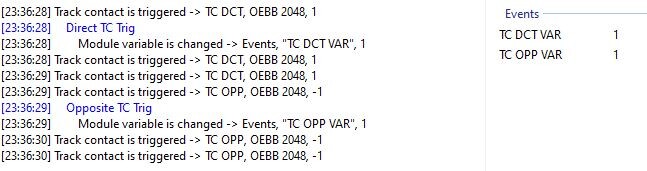
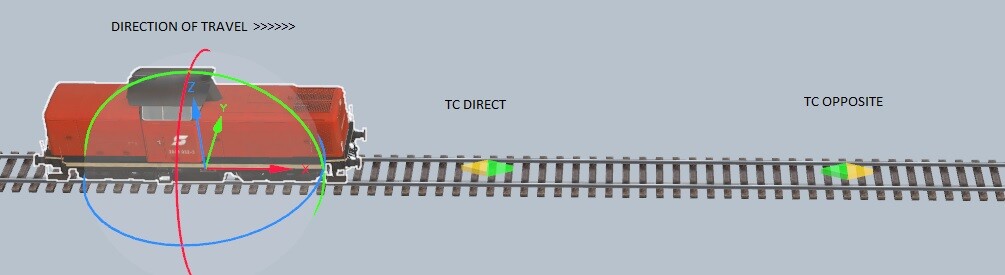
Hey guys Sorry for hijacking the thread and continueing in english. Feel free to reply in German - (It's just when writing German I'm a bit challenged:-)) I read the following in the WIKI article (linked below - Under "Gleiskontakte"): "Ein Gleiskontakt löst nur dann aus, wenn ein Fahrzeug in die Richtung fährt, in die der Kontakt zeigt". Now...Consider the example below Two Track Contacts... One TC oriented in the direction of travel the other TC in the opposite direction. Based on the WIKI article I would expect that only "TC direct" would be triggered and not the opposite but in reality both are triggered as seen below I have just added a bit of code to to each TC to verify that eventmanagement indeed executes the code when the TCs are triggered So I'm a bit confused. Is the WIKI wrong or what? I know that a condition can be applied to check for direction of travel so I know the work around...but is it supposed to work like this or am I missing something?. Thx for the support you all provide and Goetz I have enjoyed the vidoes you have uploaded on Youtube :-) Best regards Michael Christiansen Silkeborg, Denmark Courtesy translation provided by Google Entschuldigen Sie, dass ich den Thread gekapert und auf Englisch weitergemacht habe. Sie können gerne auf Deutsch antworten - (nur beim Schreiben auf Deutsch bin ich etwas überfordert :-)) Ich habe im WIKI-Artikel (Link unten - unter „Gleiskontakte“) Folgendes gelesen: „Ein Gleiskontakt löst nur dann aus, wenn ein Fahrzeug in die Richtung fährt, in die der Kontakt zeigt“. Nun... betrachten Sie das folgende Beispiel: Zwei Gleiskontakte... Ein TC ist in Fahrtrichtung ausgerichtet, der andere TC in die entgegengesetzte Richtung. Basierend auf dem WIKI-Artikel würde ich erwarten, dass nur „TC direkt“ ausgelöst wird und nicht umgekehrt, aber in Wirklichkeit werden beide ausgelöst, wie unten zu sehen ist. Ich habe gerade jedem TC ein bisschen Code hinzugefügt, um zu überprüfen, ob das Eventmanagement den Code tatsächlich ausführt, wenn die TCs ausgelöst werden. Ich bin also etwas verwirrt. Ist das WIKI falsch oder was? Ich weiß, dass eine Bedingung angewendet werden kann, um die Fahrtrichtung zu prüfen, also kenne ich den Workaround … aber soll das so funktionieren oder übersehe ich etwas? Danke für die Unterstützung, die ihr alle leistet, und Goetz, mir haben die Videos gefallen, die ihr auf YouTube hochgeladen habt :-) Mit freundlichen Grüßen