



georgeb
Mitglieder
-
Benutzer seit
-
Letzter Besuch
Alle erstellten Inhalte von georgeb
-
Thanks for "defer execution" suggestion. So obvious but ....... It was a TIMER I wish to display not the TIME. Any ideas. Thanks for all your help. It makes my hobby so much easier to enjoy. George
-
I have two items for a little help please... 1) Can I add, say, 1 minute to the current time and use this result to make an event trigger at that time. Complicated? Train released from Depot. Arrives at Signal at 14:27. Need to notify user a train will arrive at 14:30. Then release train into system at 14:30. 2) Can I display the system timers on a "TEXT" panel ? Thanks in advance George
-
Thank you. It is exactly what I require. Merry Christmas to all. George
-
I will try that tomorrow. I appreciate all the help you give to me and you do it so fast. It is simple to follow. Thanks again. George & Merry Christmas
-
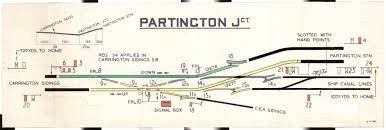
I am thinking of adding a picture to my layout. It will be a diagram of the track layout as often see high up on the wall of a signal box. Is it possible to add a .jpg for example?
-
Yes please. Can you keep georgeb@*** and drop ms@***. Thank you George
-
Please ignore. I have logged in again and all is well.
-
Not related BUT. I have lost my Pro version settings even though I am logged in correctly. It will not save my work without buying professional again. Can anyone suggest what I do please? George
-
Brilliant. Many thanks George
-
Sorry to not be clear. Both answers are of help BUT I wish to display a current clock on the layout. This clock needs to show the simulation time. (If in real time it will show real time like a clock on the layout somewhere. Thanks for you help and apologies for not being very clear. George
-
My next question is....Is it possible to display the time left on a timer (Nearest Second would be good). George, Bramhall, Stockport, UK
-
You are such a brilliant group of "helpers". My interest in 3D Train studio would have lone been exhausted without the help from Goetz and Kurt. Thanks a million. George
-
I am trying to find out the name of the vehicle stopped at a signal and then read a keyword from that vehicle. Any help would be great. Code would be preferred please. Thanks George
-
I do have V7 BUT I like to see it in V6 as well. A very good (and well presented) solution to the problem. I can use this "Train AT" method in other areas. Many, many thanks. George
-
Thanks again. So obvious when you see it.
-
I have a train at a red signal, brought to a halt by a deceleration contact. When the signal goes to clear I want the train to move off to, say, 25 km/hr. Is there a global event which can check or do I need to do it by a variable change when the signals clear?
-
Is it possible to remove a keyword from a locomotive via a track contack?
-
Brilliant. Thank you. two methods in one video.
-
Is there anywhere (in English) with examples that I can understand lists and choice from a list?
-
Just for the record: I did not know about keywords. Thanks. George
-
I have managed to find the code on the internet:- Train Name = "Down Fast London for P2". It set the absolute speed to 20 for this train and to 10 for all others if string.find(vehicle.name,"London") then layout:enumVehicles( function (vehicle) if vehicle:hasEngine() then vehicle.engine.active = true vehicle.targetSpeedAbs = 20 end end ) else layout:enumVehicles( function (vehicle) if vehicle:hasEngine() then vehicle.engine.active = true vehicle.targetSpeedAbs = 10 end end ) end Thank you Goetz for your help in getting me there. George
-
The Name is not London - it may be London Up Fast and I only need to know if the word London is in the name (not the whole name). OK/ Thanks for the tip on change to property. Great Help - Thanks George
-
I need to identify the Train Name when is enters a section. I would like to place conditions on the train behaviour (speed, route etc..) based on that train name containing a supplied word. If train name contains "London" then set train speed to 80 Any help appreciated.
-
I was wondering how I can download rolling stock and signals from the internet and import them into 3D Studio ? Any help appreciated by a new boy.
-
Henry. Brilliant. Great help and support on this forum. I do appreciate it. George "Not feeling so new now"
