



ademes
-
Benutzer seit
-
Letzter Besuch
Beiträge erstellt von ademes
-
-
vor 13 Minuten schrieb Goetz:
And don't bother now. I'm done with this ...
The one here that need to review his position on this forum is not me, Goetz… It's you and if you don't want to be botherred, let other responsible answer.
What I said gently was : you are making a mistake with your previous answer : it may not work because a group is NOT a track and so the event "train enter/leave a track" will never be triggered with your solution. That is the point.
Next, if you check the event where the group is used, MBS however indicates "train enters a track", just because of the keyword. Remove the keyword and you will discover that the only event that may be triggered is "a variable is changed"
And finally, I do not accept insults; I'm not lazy!
André
-
vor einer Stunde schrieb Goetz:
We don't even know yet if your previous one has been answered to your satisfaction or not
Hi Goetz,
Sorry you are right! I forgot to give you a feedback! The list is well sorted as you explained
vor einer Stunde schrieb Goetz:You may turn the selection into a group and name that group.
vor einer Stunde schrieb Goetz:and add variables, keywords etc. to the group
Oh yeah! great! and it is ok; I may enter keyword and variables.
BUT, snif, snif… it don't work as the group with the keyword doesn't trigger the event
Watch the layout where I tested it. Look at group L1 with keyword stationRegards
André
-
Am 6.11.2019 um 12:46 schrieb EASY:
layout:getVehicleGroup($("Lok"))
Hi Andy
Where is such Lua function coming from? Is there a place somewhere to have a list of all these functions?
Thank you
André
-
Hello,
I have a question / suggestion :
When one double clic on a track, all the tracks between 2 switches are selected. Great!
But the result is "multiple selection" on which one can only Apply some properties.
My question/suggestion : as these lot of tracks correspond to a section (or block or segment or any name one can give), is it not possible to :- give an objet's name to the selection in order to use it the same way as other objects
- give the possibility to assign object's variables to that new object.
Thank you
André
-
Hello,
I try the Following in an even :
1. define the table : rails table {0 items}
2. run : table.insert($("test").variables["rails"], track.name)
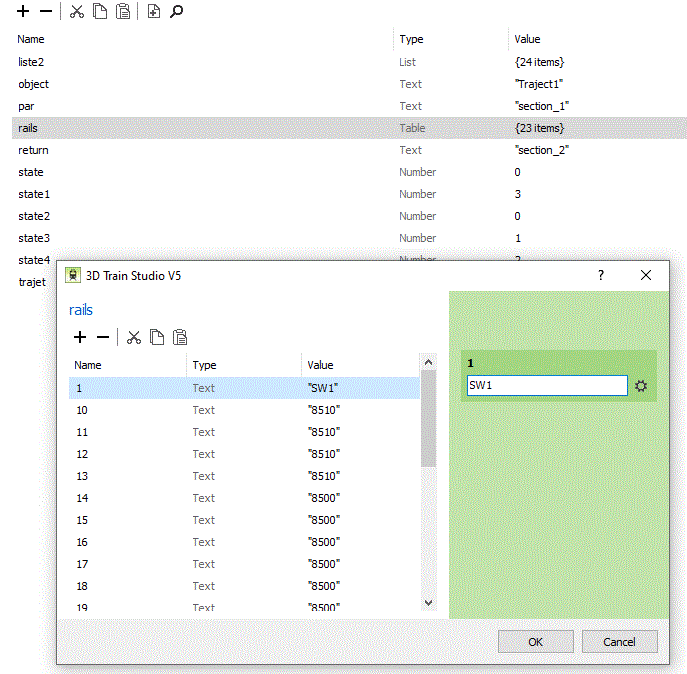
3. result : the table "rails" is well filled with all track's names, but the order is Strange - see attached 1
4. define in a script the table : liste = {}
define a table : liste2 table {0 items}5. run : table.insert(liste, track.name)
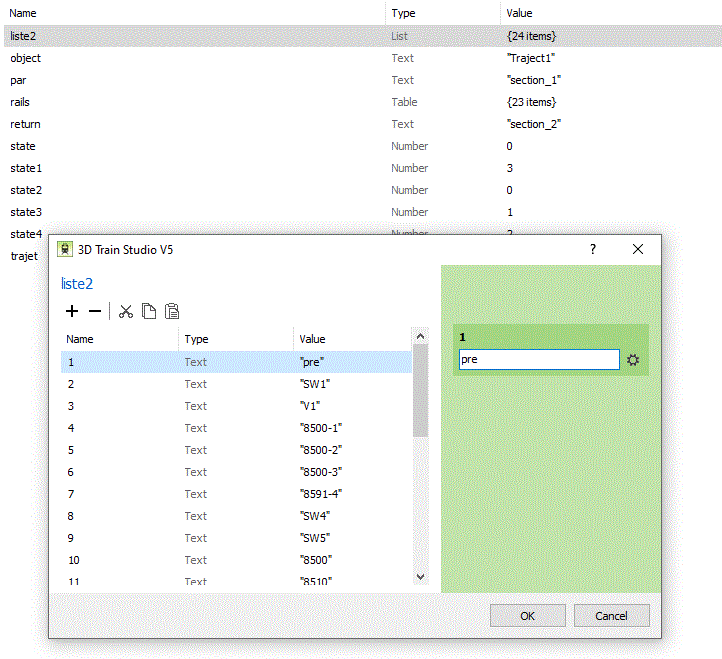
$("test").variables["liste2"] = liste6. result : the table liste2 is well filled with all track's names, but now the order is correct - see attached 2
Regards
André
-
-
Hello,
I'm still in version 5.0.6.1 and I wasn't informed of an upgrade to 5.0.7.0 including the new features I'm waiting for. I mean that when opening my actual version, I don't have the Opportunity to upgrade.
Should I do something else?
Thank you
André
-
-
Hello,
In addition to my previous message, it seems that the function "return" doesn't run properly Under MBS.
The Following should return a value for n :
function foo(n)
print ("function foo")
return n*2
end
foo(4)
print ("N = ", n) should return N = 8, but it returns nothing (N = )Regards
André
-
Hello,
I have a problem with "Function" :
I call a function with the Following arguments : setgrill (grill, listgrill, train, return_code) where "grill" and "setgrill" are tables, Train is the object "vehicle" and return_code is a variable number set to 0 when Calling the function.
Inside the function, return_code will be set to 0 if OK and to 4 if KO. But when I test the value of return_code after the call to the function, its value is always 0 even if the function set it to 4.
I've inserted the instruction "return return_code" at the end of the function, but it seems that the caller continue to test the "local" return_code.My question is : how to define the argument return_code to be valid either in the caller and in the function. Setting it as a global variable is not a solution as the function may be called by different caller at the same time.
Thank you
André
-
-
Thank you Goetz. I will wait.
Is using external files (Lua files) another alternative? And, if yes, is it recommended and what are the rules to apply?
Regards
André
-
Hi goetz,
Thank you for your help and it works fine now... except that the table "liste", even if correctly filled by the event, appears empty if I open the script where it is defined. I suppose that this is because the table is dynamic, howver its content is available in another event.
So my question now is : how to keep the content of the table "liste" when I save and close the layout. My objective is trying to build (more or less automatically) a table containing the itinerary of a specific train.
Could you help me?
regards
André
-
Hi Goetz,
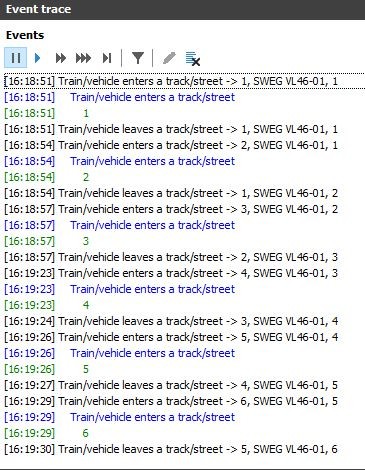
Thank you but however, the code you suggested didn't work as one can see in the attached tracing; in addition, the table "liste" remains empty and the vehicle doesn't stop.
What's wrong??
-
Hello,
Do the following Lua's functions run : Table.insert, table.remove, table.getn?
I've tried to insert the name of the current track into a table, but it doesn't work. Why?
See attached test layout.
Thank you in advance
André
-
vor 1 Stunde schrieb BahnLand:
Please "group" your conditions to make mixed conditions (with AND and OR) possible:
Thank you BahnLand, I didn't know (see) this option.
André
-
Hello,
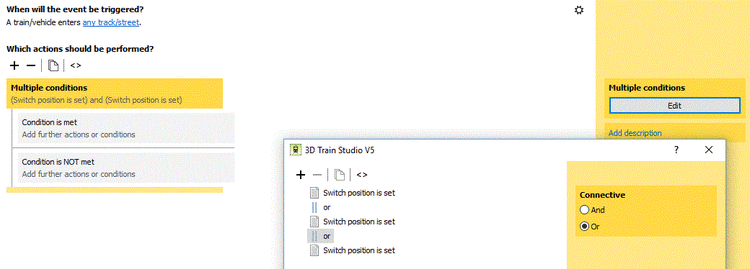
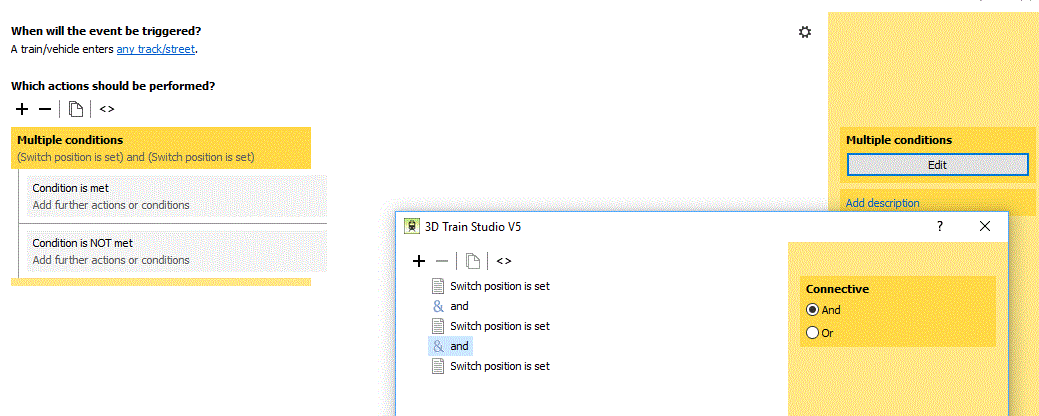
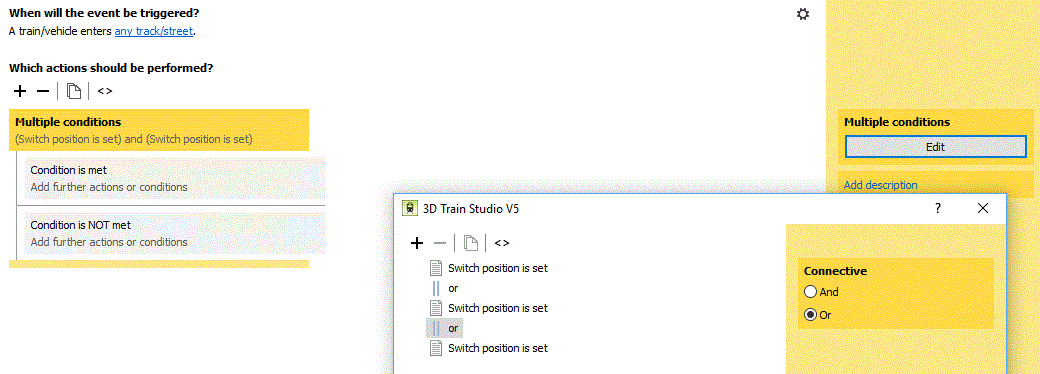
It seems that there is a bug when trying to implement multiple conditions linked by "And" or "Or". It seems impossible to have :
condition 1
and
condition 2
or
condition 3When I try to change the second "And" to "Or", both "And" becomes "Or" and vice-versus.
Regards
André

-
Am 09.09.2019 um 21:16 schrieb BahnLand:
there are 2 solution possibiities in my eyes to solve this problem:
Hi BahnLand, hi Goetz
Thank you for your explanation and thank you also to Goetz for his help in Lua. Here is my testing layout and I would appreciate to get your feedback on it.
This is based on itinerary, predefined as shown in the table (excel) in the center of the ground; each train receives an itinerary to follow that gives the position of the different switches necessary to follow the foreseen way. These itinerary are mentionned on the top of the 5 engines.
The objective is to have such a table for all switches in a layout permitting to a train to follow its itinerary safely. In the future, such table may contain more information like stop timing at station, etc..With such a system, adding a train becomes very easy : just give it an itinerary already existing, put it on one track foreseen for that itinerary and insert the parameters in the engine object. If one want to create a nex itinerary, just add a line in the table with the position of the neede switches
Regards
André
-
vor 18 Stunden schrieb BahnLand:
Do not use any time
Hi BahnLand
Thank you for your answer. This means that I have to deeply review my layout, but I will try to apply your solutions.
Notice that Goetz already suggest to avoid timers and replace them by defer execution, but my difficulty was to restart the event triggering the check because this event was originally triggered by "train enters a track". And when the train is stopped, the trigger will never restart automatically.Regards
André
-
Hello,
I’ve a problem with the event « timer expires ».
I have a station with six platforms; the trains enter and leave that station left and right. This means that one have 6 exit tracks at both side = 12 exits to manage. Each train is predetermined by its itinerary to reach one specific station’s track.
Just consider the problem when an engine leaves the station.
In order to reach the next section (block), a certain number of switches must be free to permit their reservation and positioning. If it is not the case, the train must wait. And when the waiting time is over, the same questions must be answered.The problem is that the event “timer expires” has only two triggers : “Any timer” or “only one specific timer”. No keyword available here!
Any timer : in this case, each timer that exceeds will trigger this event. So, the 1st question must be “am I on the good track? With the correct engine?” but those triggers aren’t available in such an event. è solution : save the track/vehicle into variables; ok, but where?
- in the track : no access in the timer event
- in the vehicle : no access in the timer event
- Global variable : not valid as this variable may be updated by different events at the same time and the result may be unpredictable (different trains on different Exit tracks).
- Local variable : not available over the events
- in another object : same problem as global variableOne timer : this means, in my example, 12 events doing quite the same actions. Not what I’m looking for!
In V4, I had the same problem, and my solution was to give the track name as name for the timer. So, when the timer expires, Trigger1 point to the timer name but may also be used to access the track. This solution doesn’t work anymore in V5 because the timer name may not point to an object.
Any idea or methodology to help me are really welcome.
Thank you in advance
André
-
-
the question is :
does the delay trigger the event in whitch it is initiated once again? In other words, does the event restart automatically after the delay?
Thank you
André
-
-
Neue Beta-Version 5.0.7.0
in Beta-Bereich
Geschrieben
Hi Timba and Metallix,
Thank you both to come back on this matter.
I will try to be more explicit. In many train manager that I know (CDM Rail, Train Controller,...) , the entire layout is cut into segments (Bahn Kanton??) residing between 2 switches, one switch and a signal, 2 signals. In addition,a bumper also determines the limit of a segment, including a reverse option.
These segments are linked together in order to build an itinerary. If the link between two segments is a switch or a lot of switches (called a grill in English), than the position of each of these switches determine how a train goes from one segment to the other. The succession of segments and grills together finally build the itinerary.
When those itineraries are defined, each train may (it is not mandatory) be attached to one itinerary. Normally, the itinerary name is saved as an object.variable in the engine of the train permitting to change the itinerary easily.
I knew that a group may never be treated as a track because a group may contain different type of objects having nothing to do with the tracks.
But the notion of "segment" seems to be unknown in MBS and that is the reason of my proposal. The new possibillity when double clicking on a track open in my mind a view of segmentation in MBS.
That"s all.
Now, I suppose that all users of MBS have their own solution and I respect that. And I also understand and appreciate the work done by the team to develop and maintain the MBS application. My purpose was just to bring my contribution to the project; Nothing more!
With all my respect
André