
hmclay
Mitglieder
-
Benutzer seit
-
Letzter Besuch
Alle erstellten Inhalte von hmclay
-
@Phrontistes ... YES YES YES .... I read the proposal ... thank you !
-
I'll vote for all the above ...something/anything to help editing !
-
@Phrontistes , I tried the filter using "Object " ... The screen displays when the Object was reference, but not in which event. or what was reference ( contact, or variable or property ) @EASY , The simulation doesn't stop, because there is no error, just a routine changing a property I don't want changed. @Goetz , I'll try that, Next Time .... This time I deleted the two Block Signals and the controlling "Events" ... Replaced with New Signals (Different Names), Reconstructed the Controlling Event to cure the problem. It proved to be the easier / faster method. Not the first time I had to do this .... then I run the "Event Trace" to fine any errors and remove the "code" associated with the error. Thanks to All for your suggestions .... looking forward to an easier more direct approach to analyze code.
-
I use Event trace a lot. It's great for flagging errors. But in no way can I read fast enough to catch a reference to a property. Is there a way to stop the event trace on a reference or really slow it down ?
-
Quote: So I wish a new depot feature: regardless of input direction vehicle released forward. Please develop it if possible. What if someone wants a vehicle released from a depot that backs the vehicle into a shed or parking space. How about a programmable option for output direction. I get confused with the current "flip direction when leaving" ... especially when releasing trains from alternate depots, or multiple depots feeding one depot.
-
Unless I'm missing something, I cannot get a list of all the events that access an objects property (change) or a variable. Currently I have an unknown event changing a Signal property that starts/stops trains reverse from what is desired. When I Manually change the properties this unknown event changes them again. Whatever event is doing this was most likely from an older events logic,, and I have no clue which event out of many many events in many folders/subfolders.
-
I would prefer the no vehicle / empty ( your standard Default), because then the routine just wouldn't work and not create a problem, plus be as all other actions. Leslie suggested All / Trigger ... my second choice would be default to Trigger Thanks for the consideration !!
-
Probably not the forum to post in. But I'm currently very fustrated trying to edit my latest layout . It's large, 4mbytes, and editing is a bigger chore than construction. I have now spent more time trying to get it to run than creating it. Granted, I'm learning as I go, however not being able to search for objects or variables ect and find out where the problem(s) may be is a major problem for me. The program is very capable in its operation thus the learning curve is high ... not really geared for the a novice, more toward tech savy users. (Ones that make no mistakes). I'm getting discouraged to the point of ending creating large laypouts and just doing small layouts/ examples, or none at all. Maybe I just need to take a break. Sorry for the rant!!!
-
I don't know why, but this catches me "a lot" ... not always. But when I forget to change the action to a specific object, or trigger, Icreates a run time mess. Simple Example(s) : Setting vehicle speed on a walking person to 5 km/h... default to all vehicles or all contacts ... every train, boat, plane, car , moving vehicle ... now going 5 km/h
-
Have a need to be able to select either START or STOP . If I'm only looking for stop or start (not both), the event triggers twice .... on start and stop . I have work arounds using delays and/or "Disable Event", but that is cumbersome. Possible ???
-
OK ... I'm guessing "NEO" has supplied most of the catalog then. Are there plans for expansion of the catalog ?
-
Guess I understand ... Are there published specs for what is considered acceptable for the catalog, or is it the discretion of a committee ? Just curious ! Catalog is good .... hard to find certain items ... Needs more American Stuff ( IMO only )
-
I also have trouble with tunnel cutouts .... seems the grid, although fairly small, is too big . Pulling landscape to form around the tunnel is difficult / time consuming.
-
Personally, I use the basic shapes provided to make stuff because I don't want to learn Blender while I learning LUA and 3D studio. Combining shapes, textures and colors have worked for me. Expanding the functioning of basic shapes would be great for simple projects ... simple movement would be awesome. I wish that ...." For Neo, the feature request is not relevant, so that's the end of it, right?" ... was not true. !!!!!
-
@streit_ross .... Do I understand correctly, that the models in the two pictures WERE NOT submitted for the catalog. They seem of quality enough to me. If they are not suitable for the catalog, then what is ? Could models be submitted in the MODELS or LAYOUTS forums for the general populist to share? (I haven't looked thru it yet .). @streit_ross ... would appreciate if you sent your models to me ...
-
Ran across this and noted its 2+years old. Was this fixed in V9 ... if so how do you turn off those white lines. They get in the way of placing objects for me, cannot see the outline of the actual object. Makes it hard to place a girl on the seat of the chair instead of the top of the chairback or a boat seat. Stack option goes to the highest point. Like the needle of the chapel !
-
clever @Phrontistes ... always thinking. My specific problem is, I will not know what # it is because the vehicles go in at different times. So a different # each release ! Thought of keeping a list ... but have not given it the time to develop. So I thought, no harm asking, and realize it must be a common problem before being addressed.
-
I thought this was previously requested, but could not locate. Being able to select the vehicle to release from the list of vehicles in a Depot .... (as you can accomplish from the Planning Screen), without utilizing LUA. Options available are First, Last, Random in 3DMS Good for simulation of a YARD.
-
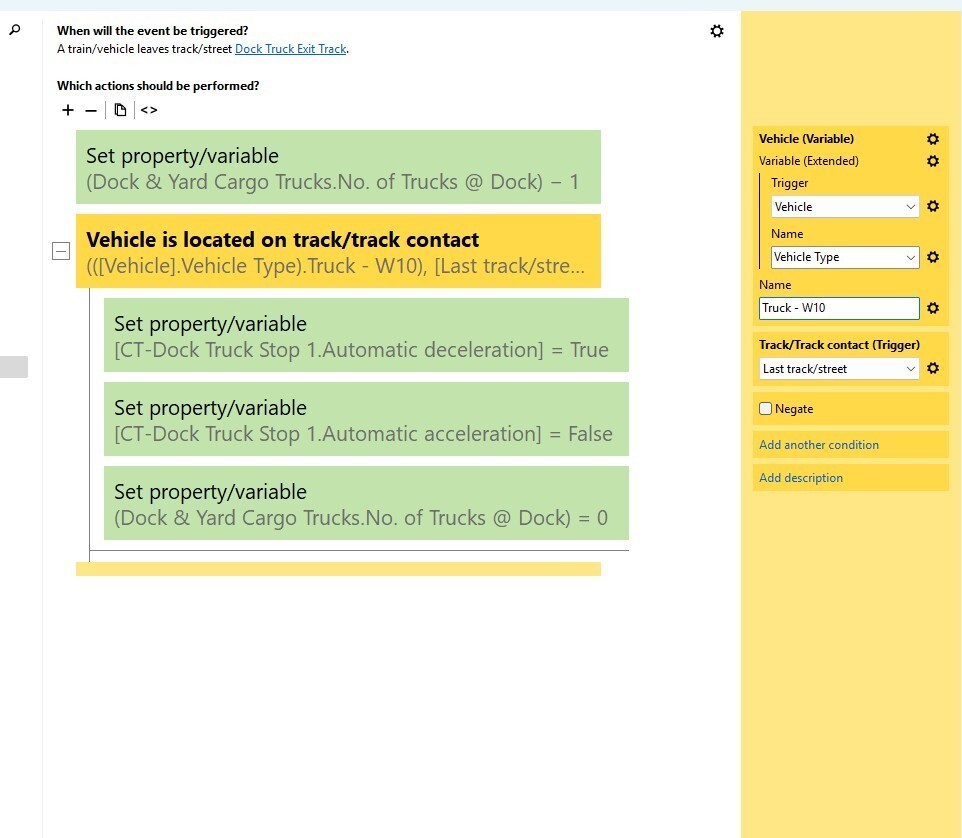
Thought this may be a problem. I'm not using this action ( Vehicle is Located on Track/Contact) correctly. Most likely my core problem concerning this topic. Thanks, I'll use the method(s) you provided. Howard
-
Is The attach valid technique

-
Thanks for the advice. When I duplicate, the duplicate is superimposed on the "original". I usually just put the cursor on top and drag to another location , then rename it. I'll change my ways, and rename it first since it becomes the active model. Thanks ! Just read @Phrontistes response ... I like that !!!
-
Not sure of error message, but is using "If Variable Exist", then checking for what TEXT is assigned the correct method. I'm assuming that if a vehicle is not assigned a variable, and a check is made, that creates an error of "null" value, rather than just skip over that statement. So that is why I started to use the If Variable exist check. Why would that not work ... but in some some events, removing it does, even on cars without a Variable assigned. In one event I need the If Variable Exists, in another it does not work ????? What is the correct method of checking for an assigned Vehicle Variable, ? Since I was getting inconsistent results, I thought using the Objects name may be a better option. Then assigning that name to every vehicle needing directed. Any thoughts ?
-
I would love to have a search engine for finding stuff within events. I sure can't remember where I use variables etc. Guess I could learn to export the events and search as @simonjackson1964 did, but that seems laborious. Yeah ... search engine for stuff within multiple events would be a time savor .... I make too many changes along the way, and lose track of what I'm doing.
-
Thinking I'm doing something incorrectly using variables with Trains/Cars. See if I can explain .... 1.) I assign a variable to a Vehicles named Vehicle Type which is "TEXT" 2.) Lets say I assign Vehicle Type as a place to go at a junction ... for example "Yard", "Dock", "Warehouse" 3.) Vehicle gets to a "Contact" just before the Junction and an event using Vehicle on Track/Conctact True False ... do this, that or the other .... normal stuff. OK what's my problem ... seems to work sometimes/sometimes not. So I run the F12 monitor. Some of the events give an error of empty variable. Some events do not. NOTE: Many Vehicles ... not all vehicles were assigned a "Vehicle Type", only the ones I wanted to go to a specific location. So I started to use the condition "If Variable Exists" ... Then under True, I determine what the Vehicle Type is and act accordingly. Sometimes that works, sometimes that generates an error and I remove the "If Variable Exist" ... and that Event works without error. I'm doing something wrong I suspect ... don't have a clue what. Hope I explained this well enough !!! Any Ideas ????
-
I use the duplicate function in 3DTS, not the copy. I'm I using the correct method. Copy/Paste didn't seem to work so well. I have noticed, that when I duplicate and drag what I thought was the duplicate object, that may not be the case. The object that moves just may be the original. Then I change the name or whatever and it gets all messed up in the Events. If the object is reference in several events ... well it's hard to chase down and causes lots of errors. BTW, I desperately need a search engine to find where objects, variables ect. are used in events. Is there a way ... I've looked but haven't found. Search for items on the screen yes, but not in the events. Howard