



hmclay
Mitglieder
-
Benutzer seit
-
Letzter Besuch
Alle erstellten Inhalte von hmclay
-
Phrontistes , thank you very much ... that will save me a lot of work
-
Having the exact same problem as Phil Purchased a new computer this week, and achieve 16 FPS, my old computer was at 6 FPS. If I run a smaller program from the examples, I get 60 FPS ... never more than my Monitor scan rate. Would be satisfied with 25 to 30 FPS ( the eye is 33 FPS I'm told ) Checking the activity of the CPU and GUI, they are only working at 10 to 15% capacity at most. Setting all options to lowest resolution or OFF, and selecting computer performance at High doesn't change 3DM performance at all. System is: MSI computer , Windows 11, DirectX 12 Intel i7 32 GB memory Nvidia 4060 Ti with 8 GB on board 2 TB Drive Any improvement would be greatly appreciated ....
-
Thanks again simonjackson and Phrontistes .... I like that approach to using contacts . Hit home run with me. I constantly struggle with "where is that routine " for such an such function. I'll be working on the "one central place" idea using keywords and variables (something I have just started to use ). Thanks again ! Now I have to work on trying to transfer Trains 3D to a new computer ... my 10+ year old "All-in-One" computer was running at 6-10 FPS ... on low graphics settings. Looking forward to better presentations without the studdering train movement.
-
thanks simonjackson196 .... guess I have mainly used contacts also. I have contacts galore .... thought that was using them in excess ... but I better understand their function. I am having mixed success with routes though .... however that is another topic ! Phrontistes , thanks for the example ... just now downloaded and will examine !!!!
-
Thanks to all for the info .... I'mjust now starting to probe the use of extended variables. Goetz sir, guess I overlooked the use of extended variable you pointed out, and how to use it. I get really confused in all the "options" and their usage of when and where. simonjackson196 ... thanks also for your input ... never thought of using a contact keyword. There is a lot of capability in this program ... consequently a lot to learn. In the heat of battle trying to come up with a strategy with seemingly many choices to chose from ... one can become overwhelmed. Thanks much for your insight ! But I'm still unclear about Last vs New ... what would "Last" be used for ... the previous track that the train just vacated ? I presume NEW is the track just encountered ! Your explanation is helpful ... will need to experiment how and when to use LAST vs NEW
-
When entering a track I'm using Iteration to check the engines KEYWORD ... depending on response, I trigger a Turnout position. Using trigger as the Track/Contact to analyze ... LAST or NEW track appears as options. Using this I seem to get incosistant results, so I have started just using the Object option and specify the same track that started the event. Need explanation of LAST vs NEW Track usage please.
-
Months later and I've been trying unsuccessfully to use keyworks/iterations for performing animations on mutiple/varying vehicles on a track. Somewhere I ran across a mention of a youtube video you posted on the subject ( cannot locate the post now ). Watched the video ( in english ... thank you ) .... wow ... you made it easy using lamps as the subject "vehicle". Thank you much for your efforts and very instructive video !!!!!
-
Thank you Goetz for the info and fast response. I was hoping it was simple but didn't want to do anything until I was sure I wouldn't mess things up further. I was moving items to/from layers and creating additional layers when I saved the program not realizing the Terraine Layer was deleted.! I'm back to SNAFU ............
-
Heading says it ... lost my Terraine layer . I have previously saved versions ... is it possible to retrieve the Terraine from those ? Any tricks ???
-
I would also like this option of changing the object variation. I was looking for a way to do this before I opened this request to find out it is not available. Sure would be a great addition !!!!!
-
Thanks simonjackson196 ... that's a good point for me to keep in mind. I'm just getting started using keywords and such. Overlooked the use of variables, and as Goetz stated, looking at keywords as a variable was incorrect. Between both of your responses, I have a better understanding. Thanks much!
-
Thanks to both of you for the responses ... they are both helpful with understanding how variables/keywords work. Goetz , you explained how to correct the current situation. Labels and information ... that says a lot ! simonjackson196, you gave information that helps me further understand how to use keywords ... future situations will benefit from that info. Thanks to both of you for your help !!!!
-
Can someone explain how to pass or reference a keyword from a user event. Do you use a list, table, variable, extended variable ??? .... do you need to know the keyword ahead of time ... or can you find a keyword from an unknown vehicle on a track/contact .... the track section is short (end of track bumper sort of thing) Thanks!
-
simonjackson196 ... seems we are on the same "track" .... I too like to have one callable event (subroutine) that's called to do a repetitive job. The user event allows for that technique with the passing of variables etc.. Takes some thought to implement, but worth it in the long run. The hard thing for me is getting use to the nomenclature used in the program. Sometimes an item is referenced as a switch then a signal .... a switch is a turnout or a physical switch and switch is listed in several selectable categories. Triggers ... when to select ... and all those "cog" icon selections are the equivalent of which witch is which. Has taken me some time to sort out. If it wasn't for the help of this forum, it would take longer or become impossible at times. Thanks to all who give help !
-
Goetz .... That may be the approach I've been looking for ..... Thanks I will certainly try that. Learning as I go !!!!
-
Thanks for the reply ... If I understand this correctly ... I cannot just group the blocks and assign a keyword to the group , then trigger that group ... I must assign each item in that group a keyword. Kind of what I thought .... I have 512 blocks in my control panel, most of which will need a keyword (maybe more than one per block) that's a lot of mouse clicking. Be nice to be able to group 10 together .... assign one keyword to the block .... then switch all in that group to a value. Seems group is more of a scenic tool. Thanks again for responding!
-
Constructing a Control panel using the "Blocks" provided. When I change a Switch (Turnout) on one Block then a number of blocks must change to show the route (typical) I now assign a keyword to EACH corresponding block that I want to change. Would like to group them together and assign one keyword to the group and have all the blocks in that group change "Color" Possible? .... better approach? Sure is tedious to assign each little block a keyword! Thanks .....
-
OK, now I understand. I do use Audicity, so I can/will convert. Is that what is causing the problem with files not showing up in "My Music" folder? I am using some MP3 Files, and they don't seem to show up either ....
-
Yes, with that information, I was able to get my event to function. Thanks a million ... still don't fully understand extended variables, as I would like. However, with each piece of information, hopefully it will just dawn on me. Again ... Thanks!
-
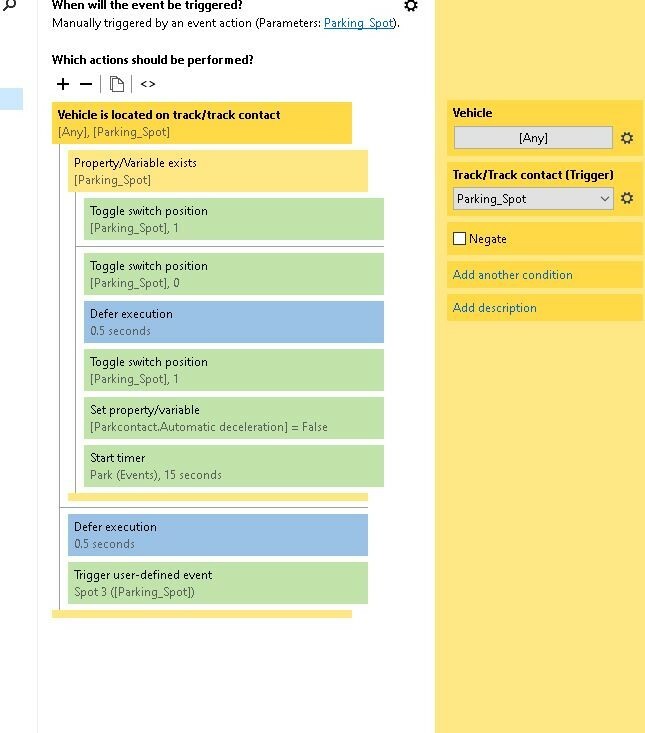
In this example ... is there a way to access the keyword of the "vehicle" on the parking spot passed to the user event. Is there a better way to access a type of vehicle on a street/track. If the vehicle has a keyword/variable "Truck", I want it to pass and not park, then wait for next vehicle. This does not work (most likely known) .... I don't know what to do with the Property/Variable exists action .... tried extended variable etc., but not successful .... Not sure what to call out on each "cog icon".
-
I'm trying to park only cars and not trucks on Country Roads 45 degree parking spaces. Each parking space is in an "Object variable list". I assigned the keyword "Truck" to those vehicles too big or long to fit the space. When a times expires, the next applicable vehicle will be parked .... if it's not a truck. What I don't know how to do is access the keyword of the listed object when it reaches the chosen parking spot . I'm real weak on variables/trigger/extended variables and the like. Can someone explain how to do this using the "variable list" and an "index variable? Thanks in Advance Hope I explained this OK !!!
-
Again .... Thank both of you for your help. I appreciate the "Keep asking, we're eager to help" theme. I have questions ... you have answers!
-
Goetz and simonjackson196 ... thanks so much for the info. It took the evening, but I finally got the message. Dissecting the demo Goetz was kind enough to provide, I realized my error. I was assigning switch positions to the routes I wanted, as you would a train turnout. I thought the event would then pick the appropriate path as routes do. Then looking closely at the demo, I realized no switch positions were assigned. When I removed my assignments, the target event worked . I then realized how powerful that procedure is. No switch positions assigned, no flipping switches ... just tell the event what contact you want to head to ... and it magically heads it that very direction. Must be using GPS or something!!!! I just wonder what other wonderful routines I could be using but don't know about/how to use. I still have not mastered extended variables. My belief is that they are also a powerful tool, but I haven't taken the time to analyze their potential. Too busy planting trees and building hills and mountains plus laying track. Now I'm trying to make it all work. Geez ... this program is powerful ... but complex. The two are inseparable.
-
I'm using V8 upgraded from V7 Thanks for pointing out that vehicle targeting would be a better approach. I tried construction of a mini layout to become familiar with that technique. So far, I've been unsuccessful at unlocking it's potential. The only target it was allowing was a contact, not street or virtual. Not sure what to call out for vehicle. I don't specify any specific vehicle to turn. It's random based on a timer. Didn't spend much time, so I will need to investigate further.
-
simonjackson196... It seems I blew the whistle way to quick. There was no foul and an instant replay proved it. After a review, I removed all the tracks, virtual and otherwise, and still had the problem. OH NO ---- time to look at the code and see what was up. Having a desire to limit the number of cars entering the gas station (Limited Space) it seems I was too fast changing the 'switch' to thru, thus not allowing time for the trucks trailer to pass. I didn't want the traffic to back-up. I thought I checked that, but whatever code I used .... that didn't work either. Learned some things ... such as there are ramps to smooth the step down (need to try that) ... and the suggestion of editing the streets if I use virtual ... didn't occur to me ... So much to learn ... Thank You for your replies!
