




EricD
Mitglieder
-
Benutzer seit
-
Letzter Besuch
-
 Thank you Neo. EricD
 -
Hallo in die Runde, Ich verwende Profession V 8.5.2.0 mit Plus Pack (endet am 21/09/2023). Ich bin sehr daran interessiert, die Steuerung über eine externe Schnittstelle (API) auszuprobieren, die JSON verwendet. Obwohl ich die gesamte Dokumentation (mehrmals) gelesen habe, habe ich immer noch keine Ahnung, wie ich anfangen soll. Könnte mir bitte jemand ein einfaches Beispiel zeigen, z.B. wie man den Zustand eines Signals über ein externes Programm + API ändern kann? Ich danke Ihnen. EricD Übersetzt mit www.DeepL.com/Translator (kostenlose Version) =========================================================== Hello everyone, I am running Profession V 8.5.2.0 with plus pack (ends 21/09/2023). I am very keen to try out the Control via external interface (API) which uses JSON. Although I have read all the documentation (several times), I still do not have a clue how to start. Please could someone show me a simple example e.g. how to change the state of a signal using an external program + API ? Thank you, EricD
-
Hello Neo Could you please unlock the plus-pack for me? Thank you Eric
-
Hello Easy Thank you for your customizable Tacho BE45BE0D-FE41-4309-BCAC-5DD05E17D553 The Tacho 100-kmh is very useful. Regards, EricD
-
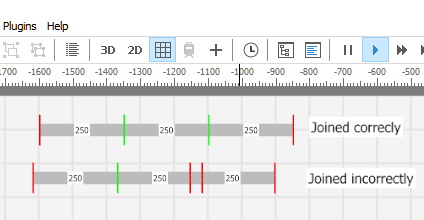
Hi Frank If 2 horizontal tracks overlap by 3mm or more they will be drawn red in the technical view. If two horizontal tracks are out of vertical alignment by 3mm or more they will be drawn red in the technical view. It's easy to spot vertical mis-alignment without using the technical view. But you need the technical view in order to spot horizontal overlaps. Best wishes Eric (Please excuse my lack of German)
-
Hi Frank Have you tried using the "Activate the 2D camera (technical mode). This will show you any bad joins as a red line.
-
Hallo, Wenn ich das Forum lese, finde ich die animierten Profilbilder, die einige wenige Mitglieder verwenden, sehr ablenkend. Weiß jemand, wie ich sie am Spielen hindern kann? Viele Grüße, EricD (Mürrischer alter Mann) ------------------------------------------------------------------------------- Hello fellow members, When reading the forum, I find the animated profile pictures that a few members use to be very distracting. Does anyone know how I can stop them from playing? Best wishes, EricD (Grumpy old man)
-
Hello fellow members Please do not discourage others from posting in this forum. I have learned a great deal from reading other peoples' posts. If you do not like the idea of coding in Lua (or C# or Java or even VB) then don't code in Lua etc and don't bother reading the posts which contain code. But please do not try to stop other people from discussing such things. I use the Pascal interface to control such things as locomotive routing. I have gained enormous pleasure from developing Delphi programs to control my layouts. I can, therefore, see the potential of an interface in a more frequently used language. When Lua was included in V5 I chose to learn that from scratch - nobody forced me to, but it gave me great pleasure. A lot of what I learnt came from reading posts in this forum. Programmers - please do continue to share your knowledge here in the forum. Please do not confine your knowledge to PN. Best wishes EricD
-
Hello Martin I tried .(dot) CTRL+space but not :(colon) CTRL+space. I won't make that mistake again! Best wishes Eric
-
Thank you HaNNoveraNer I had a memory of "hasEngine" but I was trying vehicle.hasEngine. Once again: thanks for your quick reply. Best wishes Eric
-
Hello Members Please can someone help me with the following. I am trying to build a table containing all the Locomotives in the layout. I cannot find the Lua code corresponding to "the vehicle has an engine" in the following: function GetAllLocos() local tt = {} g = layout:enumVehicles( function ( vehicle ) if "the vehicle has an engine" then table.insert(tt,vehicle) end end ) return tt end I have searched the forum for quite a long time before making this request. I hope some kind person will tell me the solution. Thank you Eric ---------------------------------------- Google translation: Bitte kann mir jemand bei folgendem helfen. Ich versuche eine Tabelle mit allen Lokomotiven zu erstellen im Layout. Ich kann den entsprechenden Lua-Code nicht finden "Das Fahrzeug hat einen Motor" im Folgenden: <Lua function> Ich habe das Forum ziemlich lange durchsucht, bevor ich es gemacht habe diese Anfrage. Ich hoffe, eine freundliche Person wird mir die Lösung sagen. Vielen Dank Eric
-
Hello HaNNoveraNer (Please excuse English - regrettably, I do not speak German) I use the following method to bring a train to a smooth halt. (The function GetDeceleration is set up for HO gauge.) Event One: --[[ EVENT NAME: ContactBrakeIn A track contact with keyword 'Brake' is triggered upon entering --]] -- ================================== function GetDeceleration(Loco, Distance) local k = Loco.currentSpeed return 0.443451 * k * k / Distance end -- ================================== if contact.variables['Signal'].state == RED then local Distance = contact.variables['Distance'] vehicle.deceleration = GetDeceleration(vehicle, Distance) vehicle.targetSpeed = 5 end -- Event Two: --[[ EVENT NAME: ContactExitIn A track contact with keyword 'Exit' is triggered upon entering This is the complete stop which replaces the need for Lock-Tracks --]] if contact.variables['Signal'].state == RED then vehicle.currentSpeed = 0 end "Distance" is the distance from the BrakeIn contact to the ContactExitIn contact. The BrakeIn decelerates the vehicle to 5kph. It then moves at 5kph until the ContactExitIn which stops it. I hope this will help you. I am happy to answer any questions you may have. Best wishes Eric
-
Hi Bahnland Thank you. Once again I am in your debt! Cheers Eric
-
Hi Tom You said "Here I find it easier to use a scaled down (0.1) loco ... for spreading the tracks out" I am intrigued! I cannot scale a loco. When on the track the loco will not scale. When off the track it will scale to 0.1, but as soon as I put it on the track it re-scales itself to 1 Cheers Eric
-
Hi Bahnland 1. Using the track editor to produce a curved slope is much easier than joining together small pieces of curved track with many different angles. Also the resulting 'cockpit' view is more pleasing. 2. You are absolutely right about the switches - they are totally unnecessary. Thank you for pointing that out. Many greetings Eric Twisted tracks without switches.mbp
