


Herman
Mitglieder
-
Benutzer seit
-
Letzter Besuch
Alle erstellten Inhalte von Herman
-
 Hallo Ja, und in V7 gibt es viele Möglichkeiten für den Straßenverkehr. Es ist daher schwieriger, Autos unfallfrei fahren zu lassen. Grüße, Hermann
 -
Hello for for those interested, für Interessierte -- keep the target in a variable -- behalte das Ziel in einer Variablen vehicle.variables["#AU target"] = vehicle.target -- test print( vehicle.target.name ) -- end test Kind regards, Herman
-
Hello, @Neo, of course Lua is fine for me. That's what I wanted to know. Thank you Neo.
-
Hello, I can of course note the target when it is first set in a variable of the car. The original question remains. Kind regards, Herman
-
Hello, is there in the EV a possibility to find the target of a vehicle (*) ( or I overlooked it again but) ( because it was released random, and after setting another target I want to find the original target again). Or a workaround ? Kind regards, Herman ( the studio shows the name of the target track contact if the mouse is on the target symbol, you can delete it, finding that "end" track contact as new target is enough for me )
-
Hello @HaNNoveraNer, thank you for remembering me to this link. I read it before, but I'm sometimes distracted and forget things. Anyway, the solution of @michellombart does the job. Now only waiting when Neo implements it in the studio. A big thanks to both of you ! Regards Herman.
-
Hello Thomas, thank you, I will certainly look at it this afternoon. In the meanwhile : Further testing gave me a solution. I want to share it. But it is not yet Eureka. And I do no not like it. If trains demands different routes it works. So I made an identical second route Route1-2bis. From Form Signal 01 to Form Signal2. The first train activates Route1-2, the second Route1-2bis. Silly, but it works. Thanks, kind regards, Herman
-
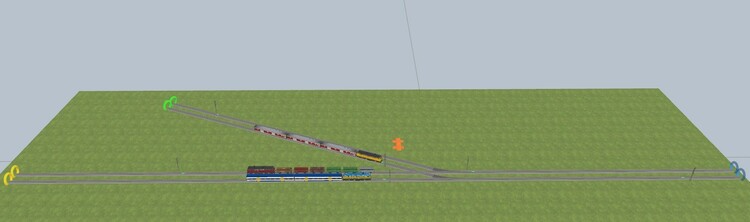
Hello, I need some help from the route specialists. I started again a test route planning like I had in V6, but want to do it with routes in V7 (of course). I'm already a bit further but I will add the most simple version. F0C50114-E303-47C5-866B-AAD916A25EEC ( draft ) - blocking is done by activating the previous route. ( no problem with that ) - as in my V6, the route planning is done by a track contact before the route, it looks wich route to activate if a vehicle is there. As you can see, it seems to work nice as long as trains demands for different routes. If a train is following another and asks for the same route ( that is not yet released * ) it does not work. Suggestions to solve it ? * To simulate what I want to demonstrate : stop a train long enough on Route1-2, only let him go if the next train is before Form Signal 01 Kind regards, and thanks for looking at it. Herman
-
Hello, even so in previous versions. Kind regards, Herman
-
Hello, I agree with @model train-old-gray. I mentioded this fact on page 1 of this forum-topic, but it was a combination signal green and a further decelerate to 0 track contact. So if the last wagon of the train is still on the previous track contact, the train will not stop at the next signal. ( yes he stops, but then accelerates again). Kind regards, Herman
-
Hello, no that is a correct answer to the question. I was of course aware of that in traffic lights,.... and so on. I only ment the signals used in train traffic. Thank you Götz. Kind regards, Herman.
-
Hello @Goetz, Can you give an example. Thanks, Herman
-
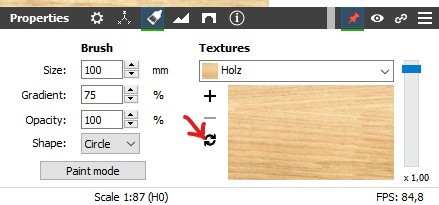
Hello, In V6 we had this option. I cannot find it in V7. Do I overlook it somewhere ? Or is this option gone ? Whatever answer, the paint system in V7 is great and much more powerfull compared to V6. Kind regards Herman
-
Sorry @Neo, indeed it just arrived, so I was indeed to soon to mention it. I had also some unexpected errors when I tried to import a .mbp file. Now with 7.0.4.0 it is ok. Kind regards, Herman
-
Hello @Neo Version 7.0.4.0 vs 7.0.3.0 ( 64Bit) at home. Do I have to download it again and reinstall ? Or am I to soon and will it come automatic ? Kind regards, Herman
-
Hello Thomas, If you mean "D16 Automatic Turntable" V6 v01 65263180-0070-4304-9936-B8F5A05A33DC. Sure, for me it is ok, I'm even pleased a specialist as you made a new turntable layout for V7. ( And the route system of V7 in general waw, exellent, no more lists to fill in with all the track switches and so on. ) Hello fellow members. Just a another very positive note. I loaded one of my finished layouts once in V6, and then in V7. The speed to load is significant better in V7. Thanks to @Neo! Kind regards, Herman
-
Hello @Neo thank you very much. Ok I searched in a wrong place. Kind regards
-
For the readers in "english language", sorry I have an "english version". There was something wrong with google translate. Sorry. Regards, Herman
-
Hello, @Neo , do we already have this version or is it coming ? Can we see the version nr somewhere ? I cannot access this options in my V7 version at the moment. ( english version ). Kind regards, Herman
-
Of course, no longer a problem. But thanks anyway. Herman
-
Yes, I missed it too. After reading the tip I could merge two panels. But cut a part of it. Please enlight me. Thanks in advance, kind regards, Herman
-
Hello, @Red grunt thanks for your answer. Yes, I can see that and understand the EV, even what's going on with the routes. I just wondered why you took this specific solution. ( and not activate by example only the route that was just finished ). But it works fine ! I'm very happy you started with mini experiment again, now in V7. Great Kind regards, Herman
-
Hello @Red grunt, I did try it out, thank you for the ME. But I wonder why in this simple case you ativated all these routes together ? Kind regards, Herman
-
Hello, I noticed in V7 beta that when trains invoke to activate or release a route the * appears to warn that the layout should best be saved. Even if there are no other modifications. Not my favorite. Is it gone to stay like that in V7 ? Kind regards, Herman
-
Hello @Neo, thanks for the new release. ( the km/h in the depots is solved in the english version , there are still minor words in German in the english version ex : taste 0 geschlossen, but only to mention, it is not important at the moment ). Hello fellow members. A question, V7 is updated today, here on a computer that's gone to dissapear next days and make place for a new one. But on the official site I can only download the most recent V6, not V7 betha. How should I proceed on the new computer ? ( and the .exe from the last release is not in my download map, I did saved the first V7 .exe but not this last one ) Thanks for a responce. Greetings, Herman

