Herman
Mitglieder
-
Benutzer seit
-
Letzter Besuch
Alle erstellten Inhalte von Herman
-
 Hello @Dad3353, thank you. Here at home patience does not help. After waiting, waiting and .... V7 does not react anymore and I have to close it. And when it comes to 2/3 download my PC starts with a lot of noice ( extra cooling ? ). So I will not try to open it a fifth time. Glad it worked with you, and maybe others. Kind regards, Herman ( however my PC is quite new and powerfull ) Hallo @Dad3353, danke dir. Hier zu Hause hilft Geduld nicht. Nach warten, warten und .... V7 reagiert nicht mehr und ich muss es schließen. Und wenn es zu 2/3 zum Download kommt, fängt mein PC mit viel Lärm an ( zusätzliche Kühlung ? ). Also werde ich nicht versuchen, es ein fünftes Mal zu öffnen. Schön, dass es bei Ihnen und vielleicht auch bei anderen funktioniert hat. (mein PC ist allerdings recht neu und leistungsstark) Mit freundlichen Grüßen, Herman Übersetzt mit www.DeepL.com/Translator (kostenlose Version)
 -
Hello, @Neo , @hajuedaub , this new layout loads here at home by 2/3 then it stopped, the only solution is to stop the V7 program, then V7 is killed and a report send to Microsoft. I just wanted to mention this. Is this problem also at other members home ? ( windows 10 64b ) Hallo, @Neo , @hajuedaub , dieses neue Layout lädt hier zu Hause um 2/3, dann bleibt es stehen, die einzige Lösung ist, das V7-Programm zu stoppen, dann wird V7 beendet und ein Bericht an Microsoft gesendet. Ich wollte dies nur erwähnen. Ist dieses Problem auch bei anderen Mitgliedern zu Hause ? ( windows 10 64b ) 468F0E02-4E6D-4940-8760-81A3E8B8AB99
-
Hallo Pitt, Genau, besser kann ich es nicht sagen. Vielen Dank, Sintbert. Es ist besser, wenn Du diese Methode selbst ausprobierst, anstatt dass ich Dein Layout ändere. Probieren Sie es erst einmal aus...bitte auf Ihre eigene Art. Mit freundlichen Grüßen, Herman Hallo Pitt, Exactly, I cannot say it better. Thank you Sintbert. It is better that you try this method yourself, instead that I change your layout. Try it first out...please in your own way. Regards, Herman
-
Hallo @Bertram-Will, Ich habe in diesem Forum einen Kommentar von Neo gelesen, in dem er sagte, dass Objekte in einem virtuellen Depot nicht mehr existieren, bis sie das Depot verlassen. ( Ich kann diesen Beitrag nicht mehr finden, und ich verwende meine Interpretation, nicht Neos Worte ). Also ja ( wenn ich richtig liege ) der direkte Bezug zum Objekt "Landbus" ist weg, solange der Bus im virtuellen Depot ist. Ich bereite gerade etwas vor. Ich werde bald wieder hier erscheinen. I read in this forum a comment from Neo where he said that objects in a virtual depot do not exist any more until they leave the depot. ( I cannot find back this post, and I use my interpretation, not Neo's words ). So yes ( if I am correct ) the direct reference to the object "Landbus" is gone as long as the bus is in the virtual depot. I am preparing something. I will come back soon here. Herzliche Grüße, Herman
-
Hallo Hermann, vielen Dank für deine Antwort. Hoffentlich werden wir ihn bald wieder im Forum sehen. Grüße H.
-
Hallo Mitglieder, entschuldigen Sie, dass ich an Ihre Tür klopfe. Wissen Sie mehr über Hubert Visschedijk? Sein letzter Beitrag war im Oktober 2021. Ich habe ihm Anfang Dezember ein P.M. geschickt, aber er hat es nicht gelesen. Er reagiert auch nicht auf die Fragen der anderen Mitglieder. Nicht sein Stil. Ich bin jetzt etwas besorgt. Grüße Herman ( Vielleicht sollte dies in einem anderen Thema behandelt werden? ) Hello members, sorry to knock on your door. Do you know more about Hubert Visschedijk? His last post was in October 2021. I sent him a pm at the beginning of December, but he has not read it. He also does not respond to other members' questions. Not his style. I am a bit worried now. Regards Herman ( Perhaps this should be dealt with in another topic? )
-
Hallo, Schöne Modelleisenbahn! Es könnte uns helfen, wenn Sie kurz erwähnen, welcher Kontakt welche Zugprobleme verursacht. (große Eisenbahn und 5 und 6 bereits gelöscht?). V7 : Bitte beachten Sie, dass ein Beschleunigungskontakt (Signal!) so lange funktioniert, wie sich ein Teil des gesamten Zuges (einschließlich Wagen) darauf befindet. So kann es bei einem langen Zug + Waggons sein, dass der Kontakt mit dem Haltepunkt überschritten wird. Ich bin mir nicht sicher, ob dies bei Ihnen der Fall ist. Schauen Sie mal rein. Grüße Herman. ( Aber ich bin sicher, dass Ihnen jemand helfen wird )
-
Hallo, wenn Sie wirklich Hilfe wollen, sollten Sie Ihre Modelleisenbahn exportieren und die .mbp hier im Forum hochladen. (*) Anstatt nur .pdf. Ein Mitglied wird Ihnen sicher helfen. Mit freundlichen Grüßen, Herman (BE) ( Vielleicht gibt es dafür einen Beschleunigungskontakt? Aber das können wir in der .pdf-Datei nicht sehen. ) ( * Oder laden Sie ihn als Entwurf in den Katalog hoch und geben Sie die ID-Nummer an. )
-
Hello fellow members, hello @simonjackson1964 , I was wondering if a combination of this methods was able to put an object on top of another object. ( different from a label ) We just lacked the method to find the heigt of an object in previous posts. But we can find the size of an object as vector ( x, y, z ) in the form of a Lua table. So I extended the demo, and want to share it with others. So thank you Simon for your question, because I needed also this solution. Kind regards, Herman Put object on top of another object.mbp ( Of course you can do all this stuff with a crane from the catalog )

-
Hello Andy, I read them in English ( Google translate ). Thank you again. Greetings, Herman
-
Hello @Andy, A big thank you. I did not know to use the model editor here. Just imported a first model. ( only to test ) works good. You helped me a lot. Regards, Herman.
-
Hello, I used the same idea. Text labels and paste them over the original model. But I think the method of Curt84328 is much better. Kind regards, H.
-
Hello, you don't expect it from me, but since my new year present, a book 'blender for dummies', I installed Blender 3.0. I studied a little, and maybe I want to go on with it, but I have a very important question. I have a simple .gbl file exported from Blender. How can I use/see this in the 3D MBS. I don't want to publish it, just look at it at home. Can someone help a total Blender dummy where to look? I searched in WIKI, interessant starting info, but I cannot find the most important one. Kind regards, Herman Hallo, man erwartet es nicht von mir, aber seit meinem Neujahrsgeschenk, einem Buch "Blender für Dummies", habe ich Blender 3.0 installiert. Ich habe ein wenig studiert, und vielleicht will ich damit weitermachen, aber ich habe eine sehr wichtige Frage. Ich habe eine einfache .gbl-Datei aus Blender exportiert. Wie kann ich diese in der 3D MBS verwenden/sehen. Ich möchte sie nicht veröffentlichen, sondern nur zu Hause anschauen. Kann jemand einem totalen Blender-Dummkopf helfen, wo er suchen muss? Ich habe im WIKI gesucht, interessante Anfangsinformationen, aber ich kann die wichtigste Frage nicht finden. Mit freundlichen Grüßen, Herman Übersetzt mit www.DeepL.com/Translator (kostenlose Version)
-
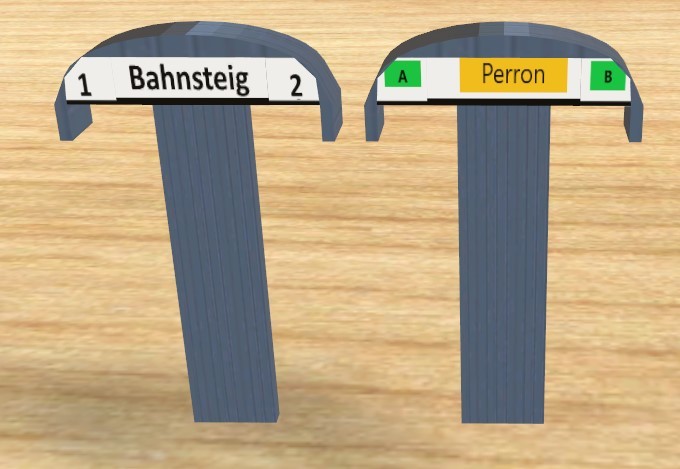
Hello @220hotwheels , I did some test. I exported the texture in a .png file on my computer. Then I changed that texture and saved it on my computer. When I give the object this new texture it is fine, on another computer the studio cannot find that specific custom texture, so it works only at home. ( stupid from me : it is called Custom texture ). Just a test, I do not like the changed one yet. Home computer : Extern computer that does not recognise my . png file Kind regards, Herman

-
Hello, I once read something like this on the forum. You get then a square with the original textures and with a graphical program you can change some parts. Sorry for this question, I want to known this. Since you then change the texture with some texture of your own (and the 3DStudio does not know of), it is only for home use ? Or not ? Thanks for a reaction. Kind regards, Herman.
-
Hello @Roter Brummer , as a non model builder I do not know if this is normal or not on a 360 30° track. And just a detail. But you said, test please ... I tested with "Umbauwagen 3achsig 1te Klasse", this one is ok. Looks also so on other rolling stock, so should be normal. Sorry. Hallo Roter Brummer, als Nicht-Modellbauer weiß ich nicht, ob das bei einer 360-30°-Strecke normal ist oder nicht. Und nur ein Detail. Aber Sie sagten, testen Sie bitte ... Getestet habe ich mit "Umbauwagen 3achsig 1te Klasse", dieser ist ok. Sieht bei anderen Rollmaterial auch so aus, sollte also normal sein. Verzeihung. Grüße Herman Umbauwagen 3yg ( middle )

-
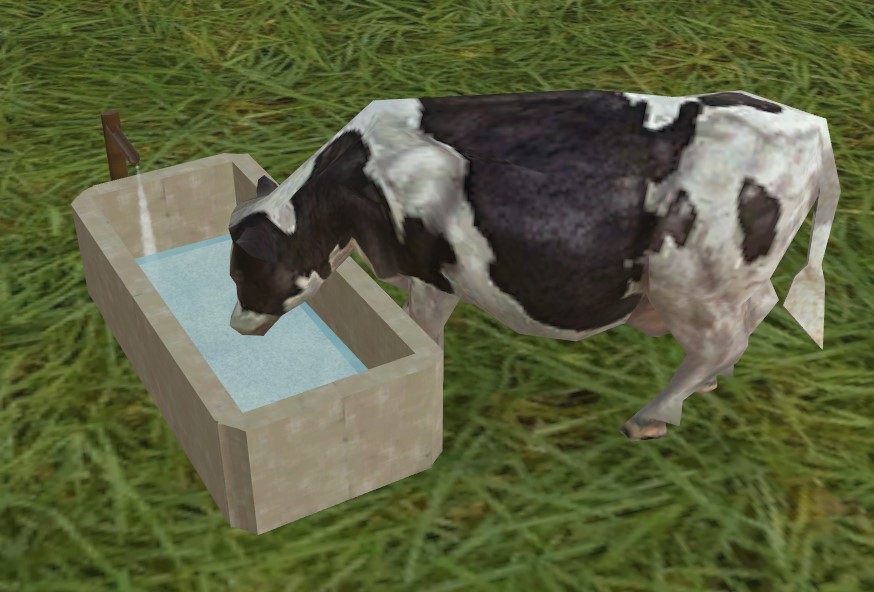
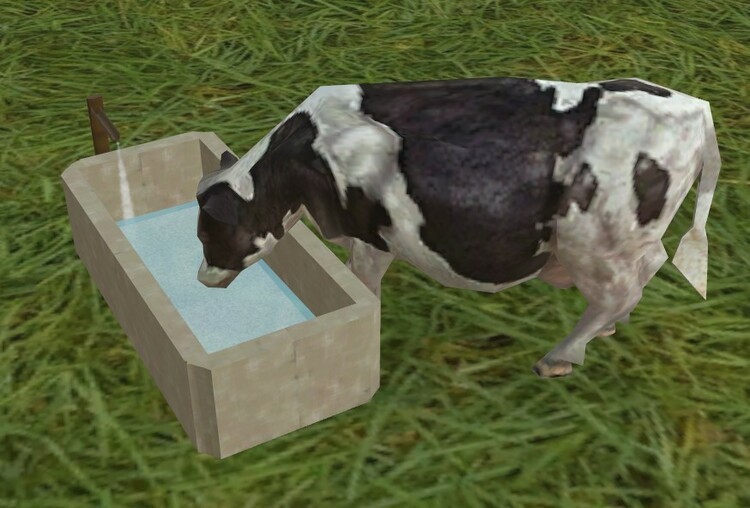
Hello @kdlamann, hello fellow members. My cattle was thirsty. Thank you ! ( mini mbp included ) Hallo @Kdlamann, hallo Mitglieder. Mein Vieh war durstig. Danke schön ! (Mini-MBP enthalten) Regards, Grüße, Herman Cow Drinking.mbp
-
Waw, @BahnLand , what a detailled explanation for this specific track layout. Thank you very much for your solution with standard Märklin tracks, and a conversion, for the cross. The fact that an expert member takes the time for making this , very nice, I appreciate it a lot ! Kind regards, Herman feedback : 1) I understand your solution and calculations. 2) This night I was thinking of another way, another viewpoint ( not an angle to calculate ) to the problem. Possible a dead end, I will not disturb anyone with it. ( Only very bad for my sleep )
-
@Goetz , don't care. And thank you again. Regards, Herman.
-
Thank you @Goetz , now I can follow what you ment in your post with the -77,4. I was not looking for that as you understand already. If someone knows a method to convert two correct placed tracks to a single object ? Maybe a look from another angle ? On the other hand I will still use @FeuerFighter 's ruler. Kind regards, H.
-
Hello @Goetz , Thank you for looking at the problem. I'm not clever enough to understand directly what you mean. My figure for the cross was not the correct one, so I edited previous post. The angles are now correct. By using FeuerFighter ruler and putting the object on 0,0,0 in the layout, I measure the x and y offset from the curved rail. And it works. But it should be much easier if I find the x and y offset by calculation, not with the ruler. I will put here the demonstration layout I used for the pictures. The parallel tracks are separated by 77,4 mm. Can you calculate the x and y offset to use in EDIT, positions. Maybe then I can understand what you ment. Sorry. Track conversion V6.mbp Kind regards, and thanks in advance. Herman

-
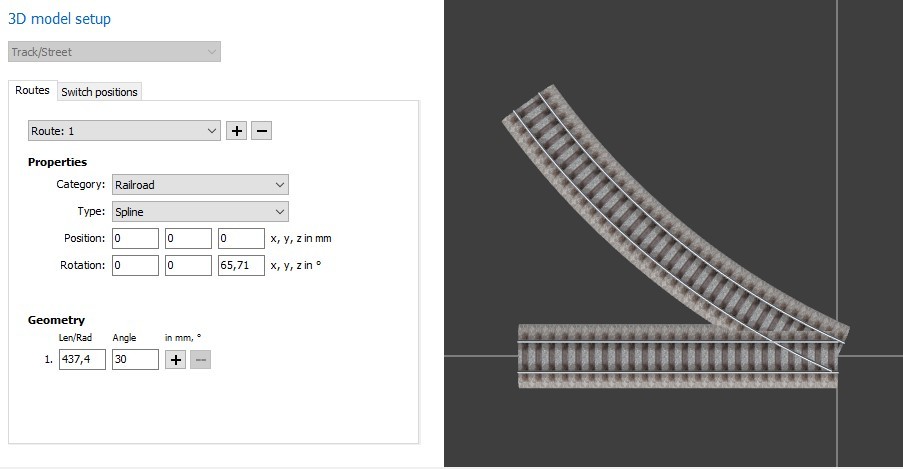
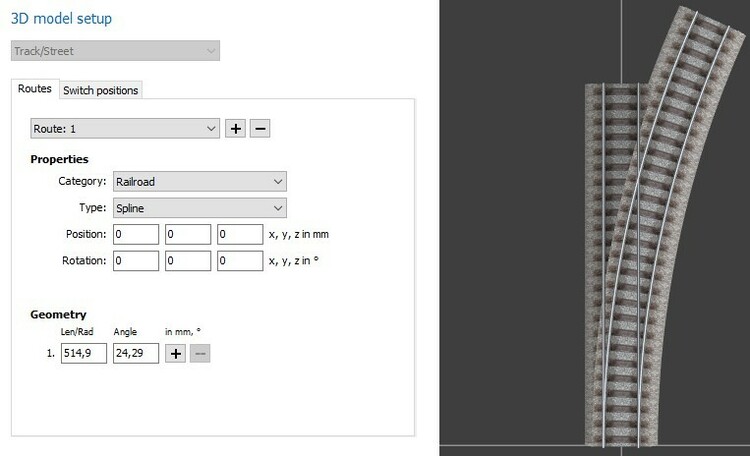
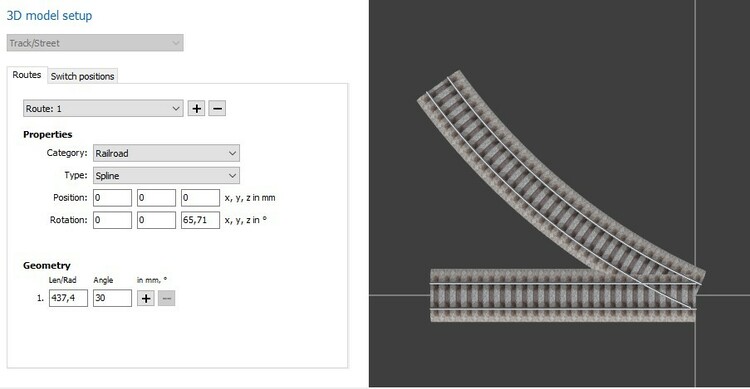
Hello fellow members, I want to go a little further. The shown track switch is in this case accidentally easy to convert. Just make an extra route for the curved track, with the same length and angle in “geometry”. This is because the x,y,z positions and x,y,z angles are 0,0,0, the same for both routes. But the cross is more difficult. There must certainly be a way to calculate the x,y,z positions and x,y,z angles. ( In stead of measuring with the ruler ). In this picture, the correct geometry is used. How can I find the position / rotation for both ? Any help ? Kind regards, H.
-
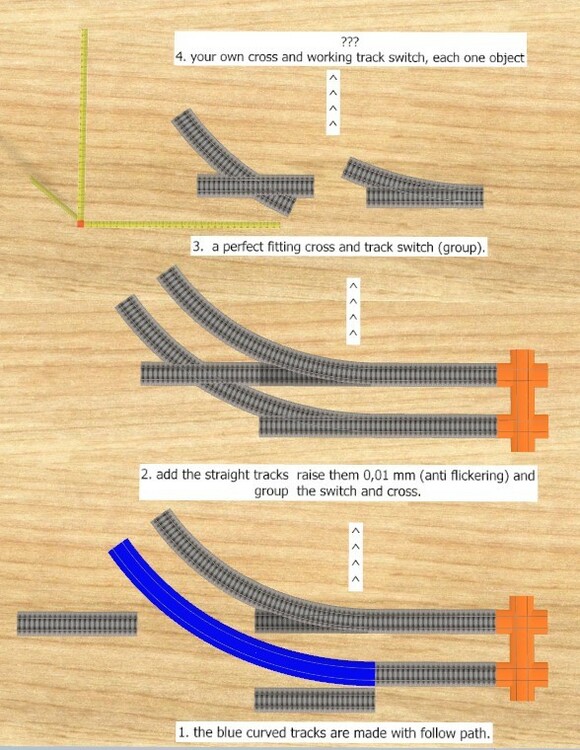
Hello dear members, The picture give a clue what I ‘m looking for. I have already a solution for this. I am able to convert the groups into two single objects , a cross and a working track switch with positions. I use edit for it. But it is time consuming, a combination of writing down the lengths and angles + measuring with feurerfighter’s ruler. Are there experts among you ( @Henry - others ? ) that have a nice and general solution for this type of problem ? Thanks for looking. Kind regards, H
-
Thank you @Andy , Herman
-
Hello @Red grunt , May I ask this question ? I found your model as you said. ( Infrastructure\Urban and countryside\Public buildings ) But first I searched it in Online Catalog / New. Does not all the new models come in NEW a while ? Darf ich diese Frage stellen? Ich habe dein Modell gefunden, wie du gesagt hast. ( Infrastruktur\Städte und LandThschaft\Öffentliche Gebäude ) Aber zuerst habe ich es im Online-Katalog / Neu gesucht. Kommen nicht alle neuen Modelle schon eine Weile in NEU ? Kind regards , Grüße , Herman